
University of Maryland School of Medicine logo
Office of Information Services
All Departments
UMSOM Assistant
Windows 11
  • Home
  • Offices of the Dean
  • Office of Information Services
  • Devices
  • Windows 11
  • Devices
  • Mobile Device Setup & Management
  • Windows Management
  • Mac Management
  • Windows 11
  • Supported Equipment

All new computers deployed by SOM IS will have Windows 11 installed.  In addition, we will be transitioning our Azure Virtual Desktops (AVDs) to Windows 11.  

Thankfully, there are not many differences between Windows 10 and Windows 11.  All of the apps that you use, such as Outlook, Word, etc., will all look identical.  Here's a quick video from Microsoft introducing Windows 11:

https://support.microsoft.com/en-us/meetwindows11

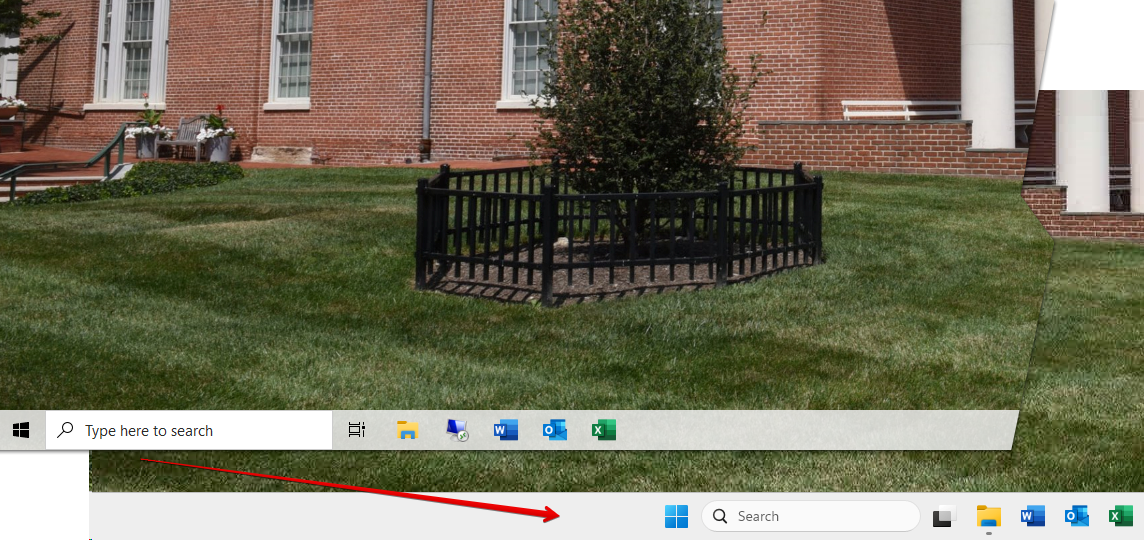
The most obvious change is the start button.  It has been moved from the bottom left to the bottom center.
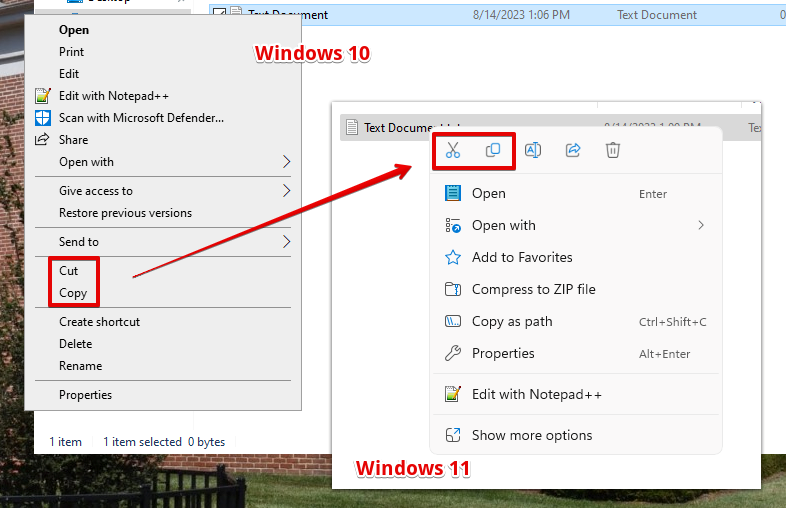
Another change is that the copy/paste options in the context menu (right click menu) have changed to icons.
[back to top]

University of Maryland School of Medicine logo
  • Departments
  • Programs
  • Research Centers
  • Institutes
  • Graduate Education
  • CIBR Cores
  • Offices of the Dean
    • University of Maryland, Baltimore
    • University of Maryland Medical Center
    • Medical Alumni Association of the University of Maryland
    • Health Sciences and Human Services Library
University of Maryland School of Medicine
655 W. Baltimore Street
Baltimore, MD 21201
Contact Us

© University of Maryland School of Medicine

    • Webmaster
    • Web Accessibility
    • Site Index
    • UMB Hotline
    • Employment
    • Map