
In this article [jump to a section]:
How to enable email forwarding
Email forwarding, or auto-forwarding, is the practice of having all of your email forwarded to another email address. This is discouraged because it is unreliable.
To forward your mailbox, contact the helpdesk. Your email will be configured to "deliver and forward," which will retain a copy of the email in your SOM mailbox, and then forward a copy of it to your destination mailbox.
We can only forward your mailbox to another campus mailbox (i.e. @umm.edu, @umaryland.edu, @fpi.umaryland.edu, etc.). Forwarding a mailbox to an outside email address (gmail.com, outlook.com, umbc.edu) would violate HIPAA compliance policies, as it would involve data leaving our organization in a way that we can't properly track.
Why not to enable email forwarding
Email coming from campus sources (som.umaryland.edu, umaryland.edu, umm.edu, etc.) will likely all be forwarded properly. Email coming from external sources (gmail.com, outlook.com, umbc.edu) have a chance of being blocked.
Email forwarding can still be used, as long as you enable Keep a copy of forwarded messages, and be sure to check the source mailbox occasionally.
Here's why some emails will be blocked when forwarded.
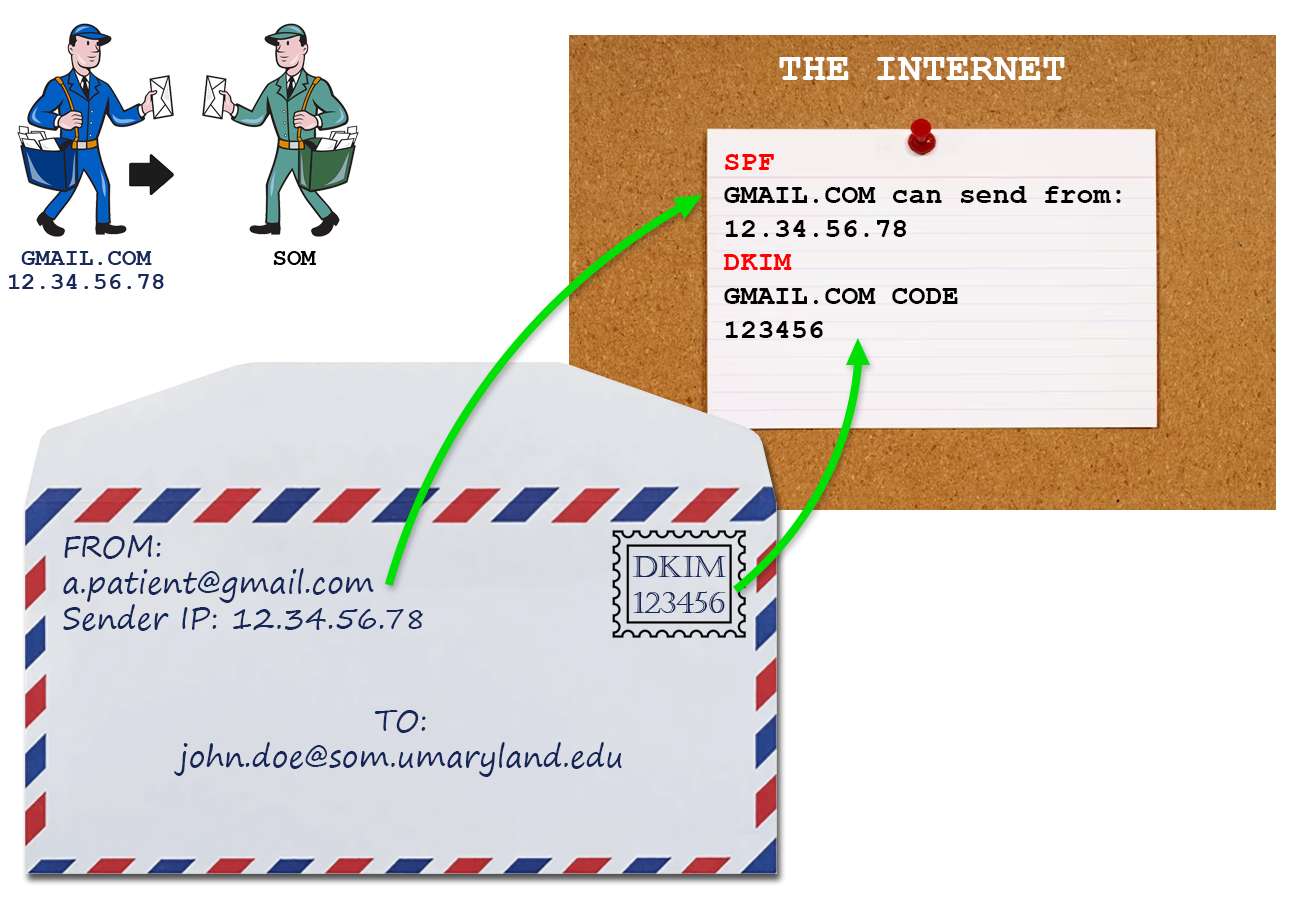
Email security consists of SPF (sender policy framework), DKIM (domain keys identified mail) and DMARC (domain-based message authentication, reporting, and conformance). For SPF and DKIM, the receiving email server compares a part of the email with information that's available publicly (DNS), to make sure it is legitimate.
Take a look at this email. The address that it comes from, shown as a Sender IP, is checked against a publicly available list of addresses (or IPs) that are allowed to send email for gmail.com. The stamp represents DKIM, which is like a code embedded in the email that is checked against another half of the code, available publicly in DNS. This is another way to make sure the email comes from where it says it does.
When an email is auto-forwarded, it passes through another mail server. That mail server overwrites its own address, or Sender IP, onto the email. This causes an SPF check to fail. When an email fails a check, it then looks at the DMARC policy. This states what a receiving email server should do with an email from their domain that fails a check. When the DMARC policy states to reject the email, it is blocked, and the email forwarding fails.
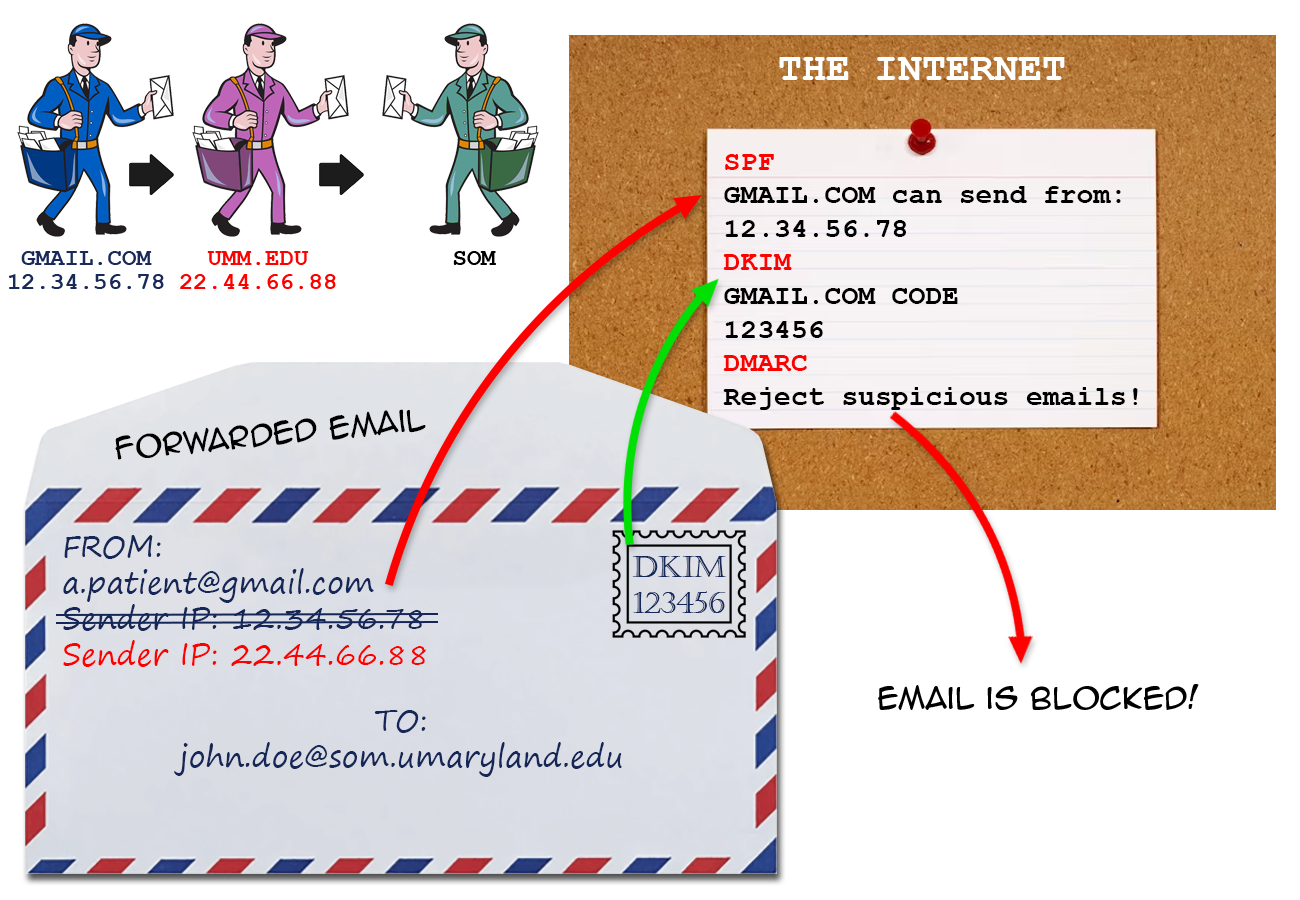 Each domain (gmail.com, outlook.com, som.umaryland.edu) has its own distinct DMARC policy. Some policies will allow a failing email to be delivered, and some will say that a failing email should be quarantined, like spam. Only those that are set to reject a failing email will result in a forwarding email to be blocked.
DMARC policies used to be optional, but in February 2024, some of the biggest email providers, such as Gmail and Yahoo, required a DMARC policy for all incoming email, making DMARC policies much more prevalent. This is why forwarding may have worked successfully in the past, but is not a reliable option now.