
Step One: Create a Link Section using the Link Type: Section
(Note: I've done this already)
The section "Sample Link Section" in the left navigation is a "Link Section." The link was added using the Link Type: Section (not External URL). When the section it is linking to exists (Sortable table), this page looks fine. The screenshot below of T4 shows the page we are linking to exists (green circle).
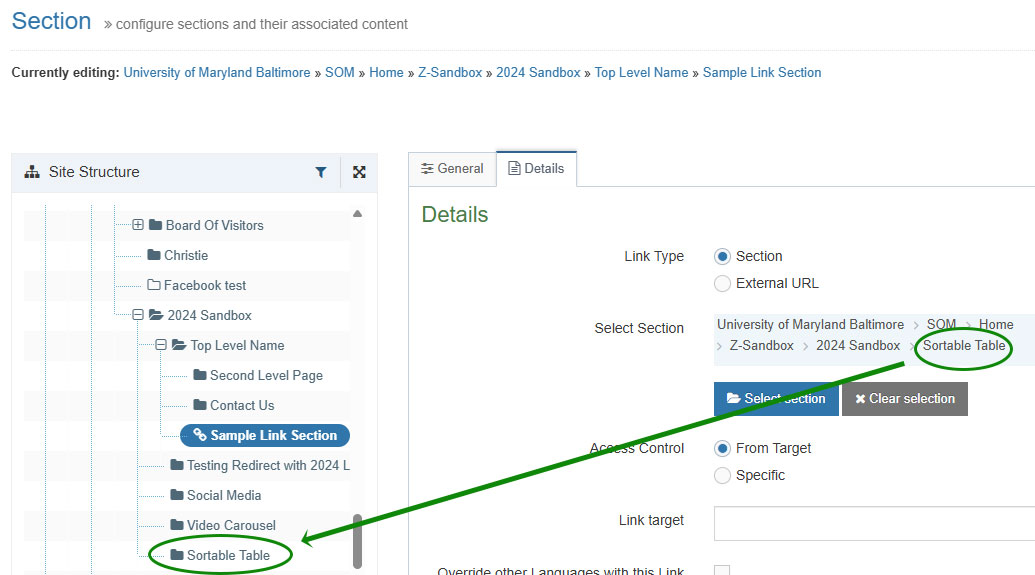
Step 2: Delete the Section the Link Section Is Linking To
Note: I undeleted it so T4 Support can replicate. Please delete the section "Sortable table."
When the section "Sortable table" we linked to is deleted, there is no alert warning that there is a link to this page. It just becomes inactive.
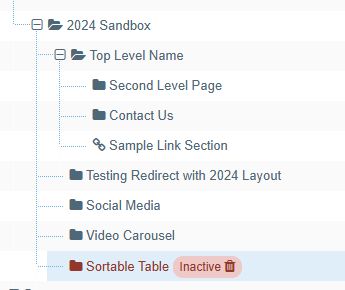
Step Three: Preview this Page
The browser ignores the css file and loads an unformatted page with the Javascript error below at the top of the page.

Proposed Solutions
- When a section linked using Link Section (Link Type: Section) is deleted, T4 should display a warning indicating that the link is broken.
- If a linked section no longer exists, the page should continue to render normally and exclude only the missing link, rather than loading without formatting.